The Switch node offers multiple pathways based on specific values.
It allows you to quickly set multiple shipping rates according to multiple conditions as customers, market, address or product characteristics.
In this example you can see how with a single node we have created 3 specific Cases:
Subtotal less then 5000
Subtotal between 5000 and 10000
Subtotal Greater then 10000
The same logic can be used to create multiple tags, products, addresses and more.
To configure the Switch you can simply click on the window and a setting page will open on the right of the screen.
Here you can click on Rule and select the condition you want to apply at the Case you are configuring.
To set this, simply click the Rule button.
Next, select the condition you want to verify and its corresponding value and the node is ready.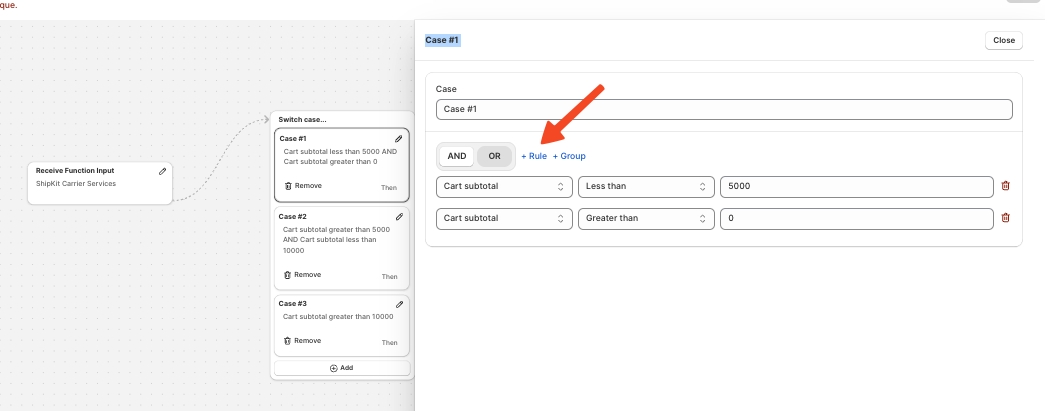
Every “case” of the switch has its own output, letting you connect each path to a different shipping rate.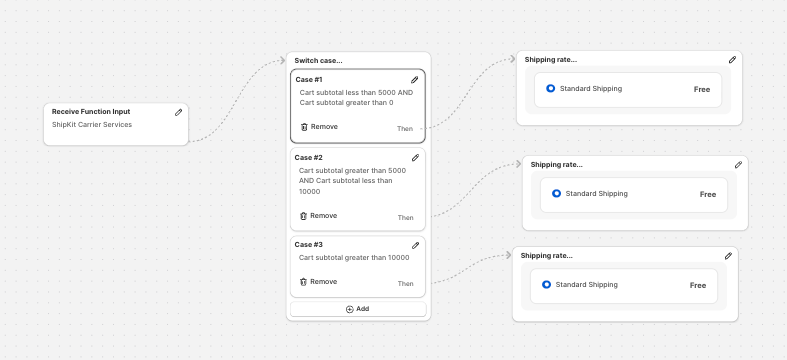
With the Switch function, you can quickly and easily create rules to apply special rates for specific customer segments, particular cart conditions, or different product types all without using any code, thanks to our intuitive Flow system.
