
Discount functions you build with SupaEasy run on Shopify POS as well as your online store, because Shopify supports Discount Functions on POS by default. This guide explains what Shopify lets you control from the admin, and how to use the function itself to decide whether a discount applies online, on POS, or only in specific stores.
Use case example: you run a 15% online promotion for a newsletter campaign, but you don't want it applied when the same customers shop in your physical store. A check on the retail location inside the function keeps the discount online, while your POS sales stay at full price.
What You'll Need
-
App plan: a SupaEasy plan with access to the function editor. All paid plans include a 7-day free trial.
-
Shopify plan: any plan. Public apps that contain functions work on every Shopify plan.
-
Shopify POS: POS app version 9.10 or later. Automatic discounts apply only at locations with a POS Pro subscription. Discount codes work on POS Lite and POS Pro.
-
Store access: admin or staff access with permission to manage apps and discounts.
-
In your store: a discount function created in SupaEasy.
-
Estimated time: 5 to 10 minutes.
Understand how Shopify handles discounts on POS
These rules come from Shopify's own documentation, linked in the Sources section at the end.
-
Function discounts run on POS by default. The Discount Function API lists POS as a supported surface. Since POS app version 9.10, an automatic or code discount from an app can apply to qualifying orders on both the online store and POS.
-
Automatic discounts need POS Pro. On POS, automatic discounts apply only at locations with a POS Pro subscription.
-
Combinations still apply. At the POS checkout, automatic discounts and codes can be used together only if each one is set to combine with the other.
Developers reported in June 2026 that the Allow sales channel access and Deny sales channel access buttons on the Discounts page appear only for built-in discounts, not for discounts created by apps. Don't rely on those buttons to control where a SupaEasy discount applies. Put the logic in the function instead.
Detect POS inside your function
Shopify added a retailLocation field to the cart input of its Function APIs (stable from API version 2025-07). The field is empty for online checkouts and contains the store location when the sale happens on POS. Reading it is the most reliable way to decide where your discount applies, because it comes from Shopify and the customer can't change it.
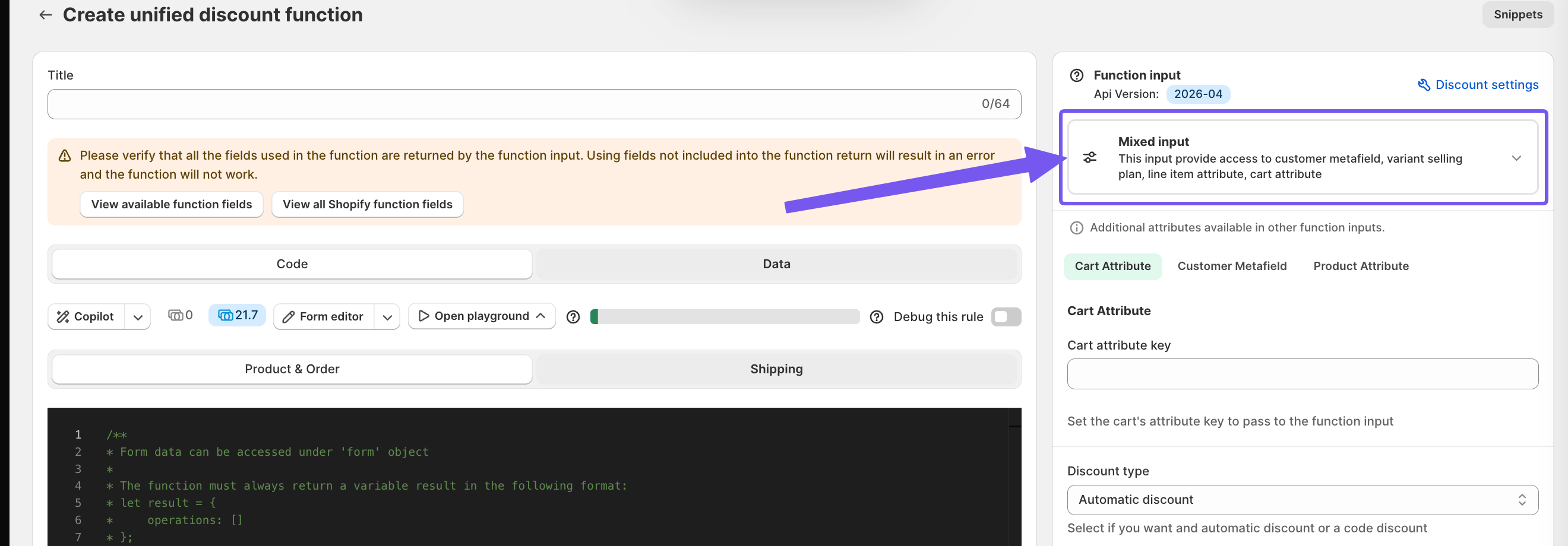
In the SupaEasy function editor, you need to select Unified Discount, select Mixed Input in the Function Input and add the field to your input query: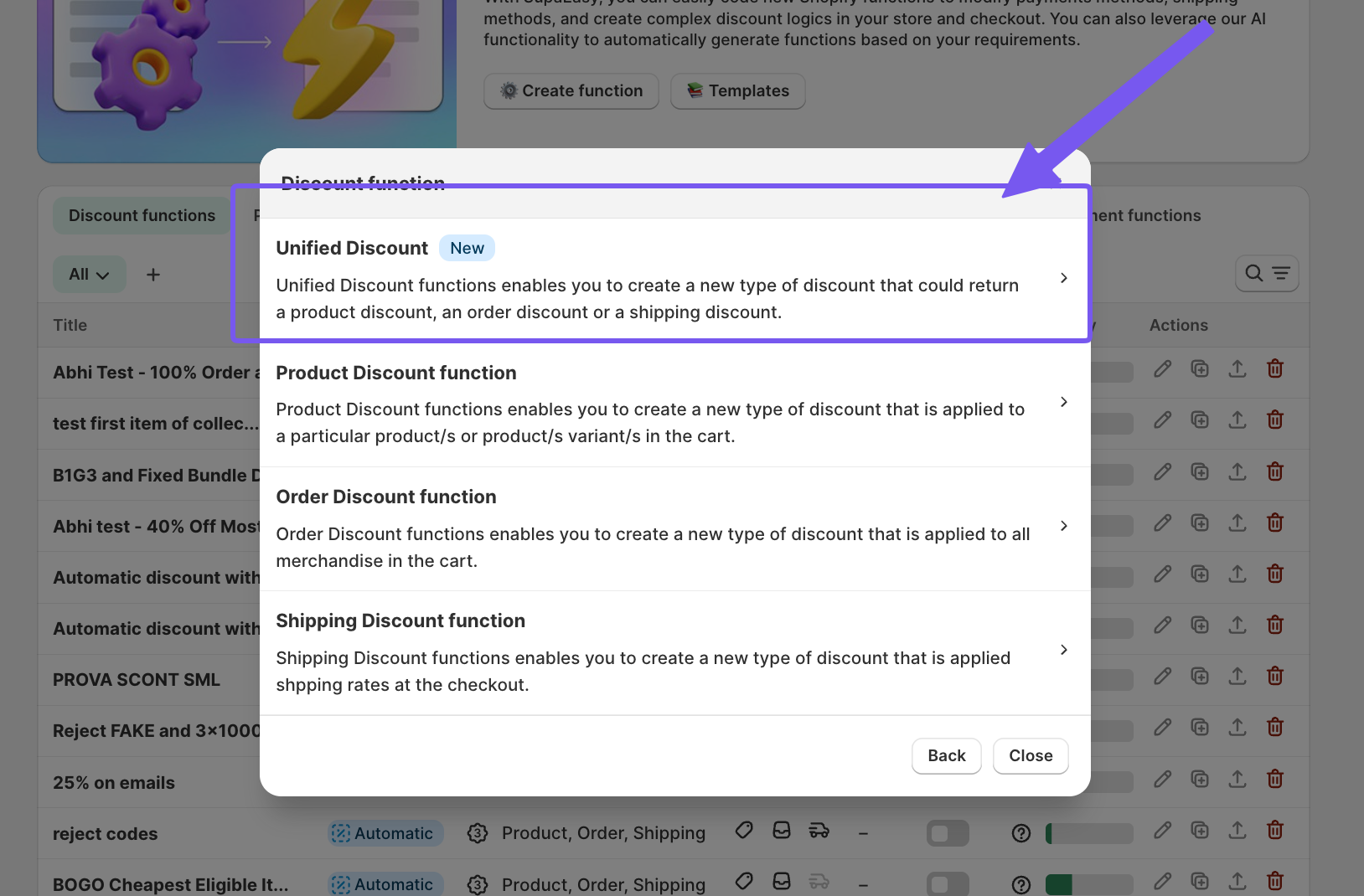
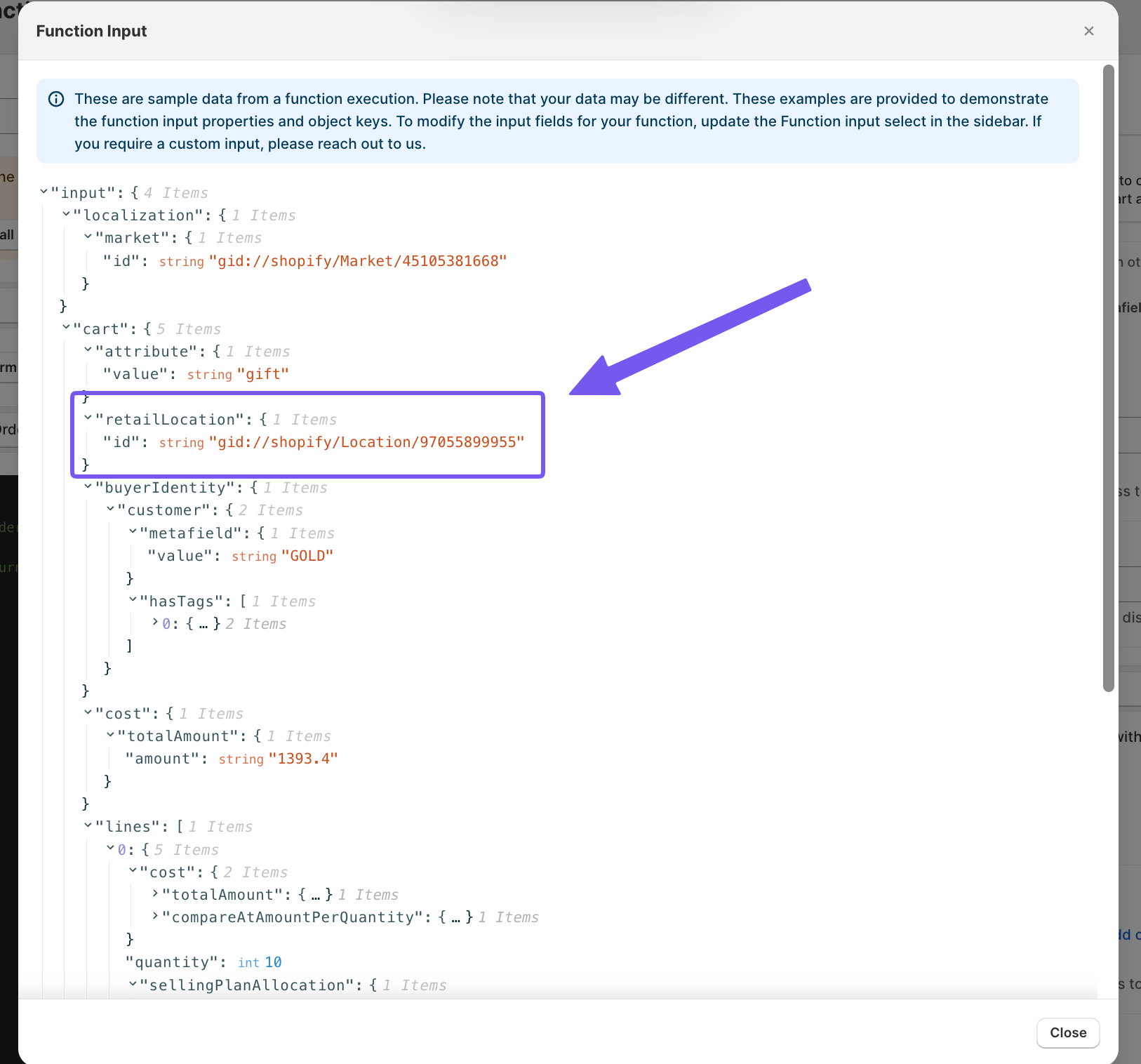
cart {
  retailLocation {
    id
  }
}
Then use it at the start of your function logic. Choose the check that matches your goal:
-
Online only: if input.cart.retailLocation has a value, return no discount operations. The discount never applies at the till.
-
POS only: if input.cart.retailLocation is empty, return no discount operations. The discount applies only to POS sales.
-
Specific stores: compare input.cart.retailLocation.id with the location IDs you want to include, and apply the discount only when it matches.
// Online only: skip the discount on POS
if (input.cart.retailLocation) {
  return { operations: [] };
}
Always check that retailLocation exists before reading retailLocation.id. Online checkouts send it empty, and reading a property of an empty field stops the function with an error.
After you save, function changes can take a few minutes to reach checkout and POS, so wait a moment before testing.
Use Shopify Markets for store-level targeting
Shopify also offers a native option: retail location markets. A retail market covers one or more POS locations (or all locations in a region). A discount targeted at it only matches sales that have a retail location, so it can't apply online.
-
A discount targeted at a retail market applies by default to the POS Pro locations in that market.
-
Market eligibility replaces customer eligibility. A discount can target markets or customer segments, not both.
-
Markets can make a discount POS only, but not online only, because POS sales also match the regional market of their country. For online-only discounts, use the retailLocation check above.
Test it on your store
The last step is yours. Before sharing a new discount with your customers, test it on both sides of the rule. Build a cart in your online store and ring up the same products in Shopify POS, then check that the discount appears only where you expect it. Try it at a POS Pro and a POS Lite location if you have both, change quantities, and if your store has other active discounts, test them together to confirm they combine the way you set them. If something doesn't look right, open the function logs in SupaEasy and review the input your function received.
Summary
SupaEasy discount functions reach POS by default, automatic discounts there need POS Pro, and codes can't be restricted by channel from the admin. Reading retailLocation in the function gives you full control: online only, POS only, or specific stores. You can reuse the same check in any discount function, for outlet pricing, store events, or campaigns that should stay online.
Sources
-
Shopify developer changelog: Discount Functions support on Shopify Point of Sale
-
Shopify developer changelog: POS-specific Shopify Function logic (retailLocation)
-
Shopify Help Center: Managing sales channel settings for discounts
-
Shopify developer changelog: Target discounts to specific markets
-
Shopify Developer Community: Sales channel access buttons removed for app discounts
If you have any questions or need assistance during setup, our team is here to help. You can contact the Nextools Support Team anytime via email at support@nextools.tech or through the in-app live chat during live chat opening hours. We'll be happy to assist you.
Thank you for choosing Nextools and using the SupaEasy app.
